
 Module 1
Let’s Understand Search
Understand why traditional search struggles and how modern semantic search improves it.
Today’s path
- The Problem: Why Keyword Search Struggles
- How Traditional Search Improved
- Enter Semantic Search
- How It Works: Embeddings
- Comparing Meaning: Distance Metrics
- Why Similarity Alone Is Not Enough
- Modern Search = Hybrid Systems
- References & Further Reading
By the end, you’ll understand the limitations of keyword search and how semantic search with vectors addresses these problems.
1. The Problem: Why Keyword Search Struggles
Traditional search works by matching exact words. That’s it. If the query string appears in the document, it’s a hit. If it doesn’t, it’s a miss - no matter how closely related the meaning is.
# Simple keyword search
if "car repair" in document:
    return document
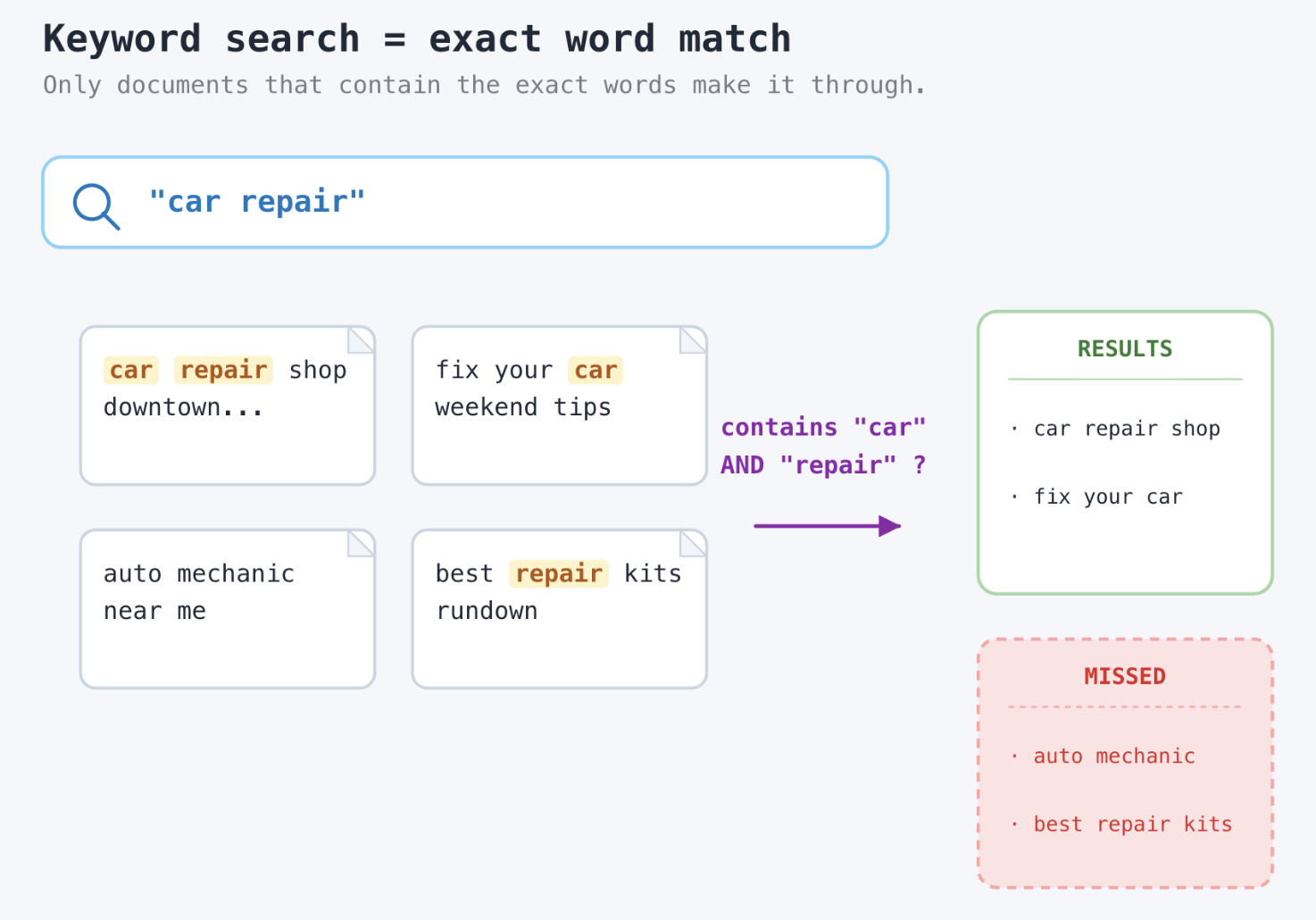
This approach works for predictable, structured queries. It breaks immediately on the language real users actually write.
Real-World Failure Examples
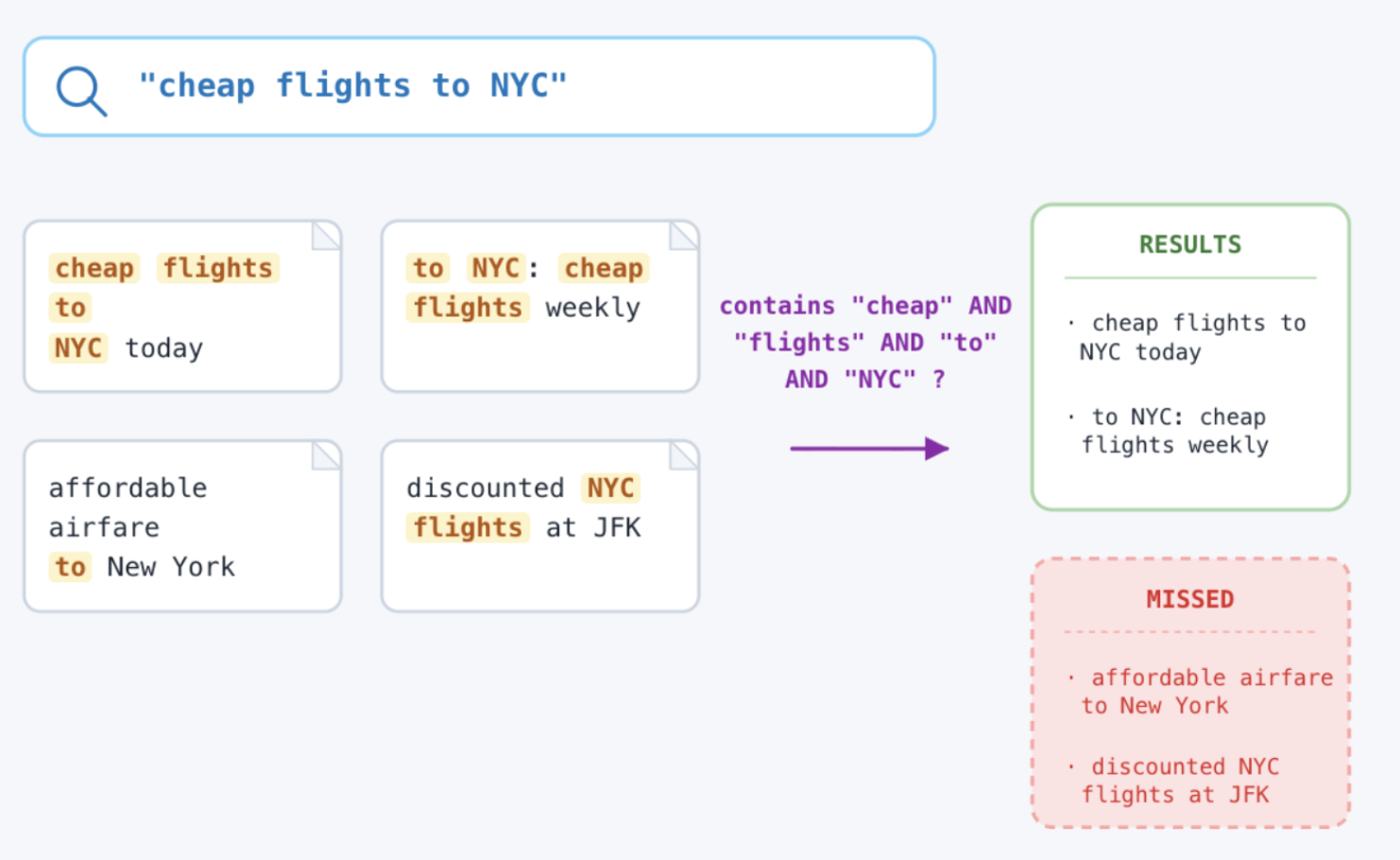
| Query | Document in the index | Result |
|---|---|---|
| car repair | automobile maintenance guide | ❌ Missed |
| cheap flights NYC | affordable airfare to New York | ❌ Missed |
| Apple stock | fruit company disambiguation? | ❌ Missed |
The Four Core Failure Modes
- Synonyms: “car” ≠ “automobile” to a keyword engine, even though they mean the same thing. No word overlap = no match.
- Paraphrasing: Same meaning, completely different words. “cheap flights” vs. “affordable airfare” are identical in intent, invisible to grep.
- Polysemy: One word, multiple meanings. “apple” is a fruit company, a fruit, a music label. Context determines meaning that keywords can’t.
- Word order: “dog bites man” and “man bites dog” use identical words. Keyword search treats them as equivalent.
2. How Traditional Search Improved
Over time, search systems became more diverse. However, they all shared the same fundamental ceiling: they work on words, not meaning.
Evolution of Search Techniques
Grep / Exact Match Find the exact string
Inverted Index Fast word lookup
TF-IDF / BM25 / SPLADE Weighted ranking
Semantic Search Meaning-aware
What Each Improvement Added
| Technique | What it added | Still missing |
|---|---|---|
| Inverted index | Fast lookup across millions of documents without scanning each one | No ranking, no relevance - just presence or absence |
| TF-IDF / BM25 | Relevance ranking based on term frequency and inverse document frequency | No synonyms, no semantic understanding |
| Keyword matching | Tolerance for typos and near-spellings (receive → receive) | Still word-based - ‘automobile’ is not a typo of ‘car’ |
| Stemming | Reduces words to their root form (running → run) | Misses cross-vocabulary synonyms entirely |
Core limitation
All of these techniques still rely on matching words, not understanding meaning. They can’t know that “car” and “automobile” are synonyms unless you hard-code that fact. And you can’t hard-code the entire language.
3. Enter Semantic Search
Semantic search changes the question from:
Keyword search asks: “Does this document contain the same words?”
Semantic search asks: “Does this document mean the same concept?”
4. How It Works: Embeddings
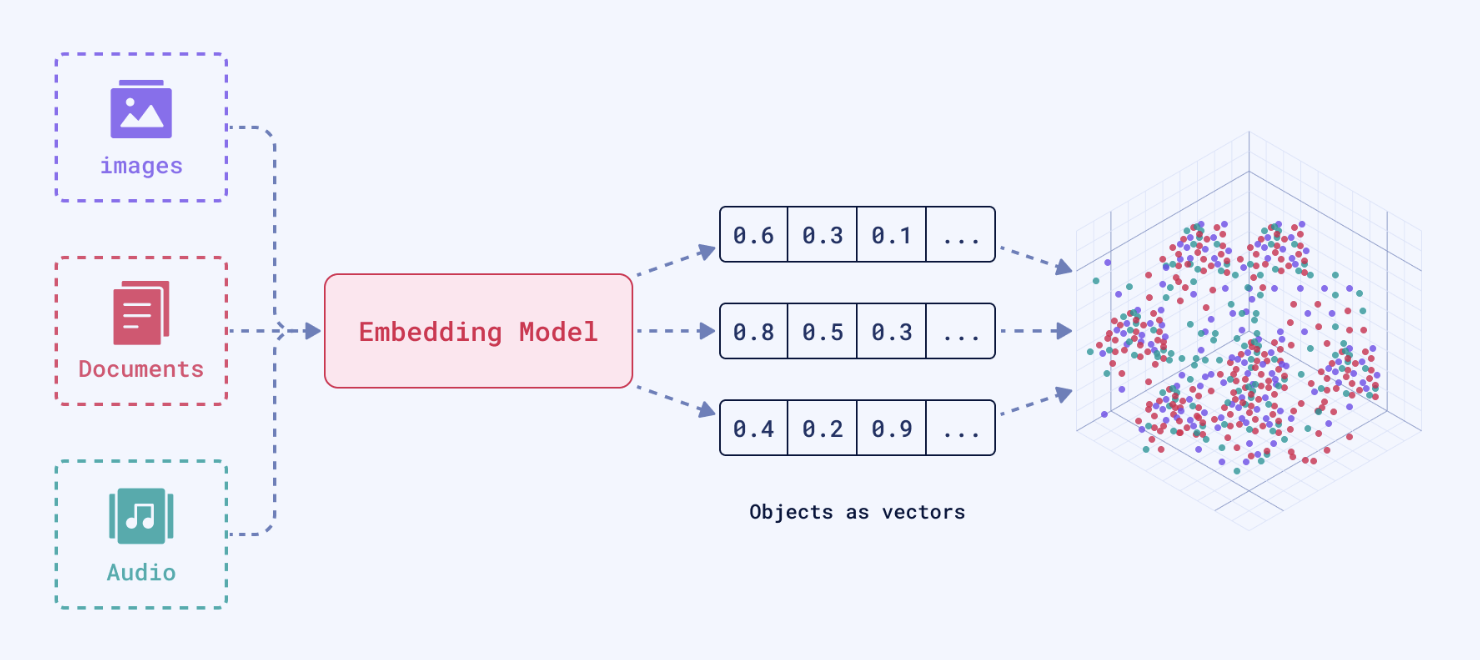
Semantic search works by converting text into vectors - lists of numbers that capture meaning. Similar meanings produce vectors that are close together in high-dimensional space. Different meanings produce vectors that are far apart.
Generating a Vector
An embedding model takes a piece of text and returns a fixed-length array of floating-point numbers. The exact numbers are less important than the relationships between them.
from sentence_transformers import SentenceTransformer

model = SentenceTransformer("all-MiniLM-L6-v2")

query_vec = model.encode("car repair")
doc_vec   = model.encode("automobile maintenance")

print(len(query_vec))   # 384 dimensions
print(query_vec[:5])    # [-0.021, 0.104, -0.048, 0.231, -0.008]
What Are Dimensions?
Each dimension in the vector captures some aspect of the text’s meaning. A 384-dimension model has 384 such aspects. No single dimension maps cleanly to a human concept like “color” or “emotional tone” - it’s the combination of all dimensions together that encodes meaning.
Model Types
- Small models (128–384 dims): Fast, low memory. Good for well-scoped domains like product search or FAQ retrieval.
- Large models (768–1536 dims): More nuanced. Better for open-domain question answering and long-document retrieval.
- Domain-specific models: Fine-tuned on legal, medical, or code corpora. Outperform general models on specialized content.
- Multimodal models: Project text and images into the same vector space. Used by Tripadvisor and others (see Module 4).
Vector embeddings aren’t limited by these models, however. They are theoretically capable of capturing any data into a transformed structured format.
5. Comparing Meaning: Distance Metrics
Once we have vectors, we need a way to measure how similar two of them are. Different metrics suit different situations.
Cosine Similarity
The most common metric for text. It measures the angle between two vectors, ignoring their magnitude (length) and focusing purely on direction. A score of 1.0 means that the vectors are pointing in the same direction and have exactly the same semantic meaning (identical meaning). A score of 0.0 means on the other hand can be interpreted as two sentences being semantically unrelated.
$$ \text{cosine_similarity}(A, B) = \frac{A \cdot B}{\lVert A \rVert , \lVert B \rVert} $$
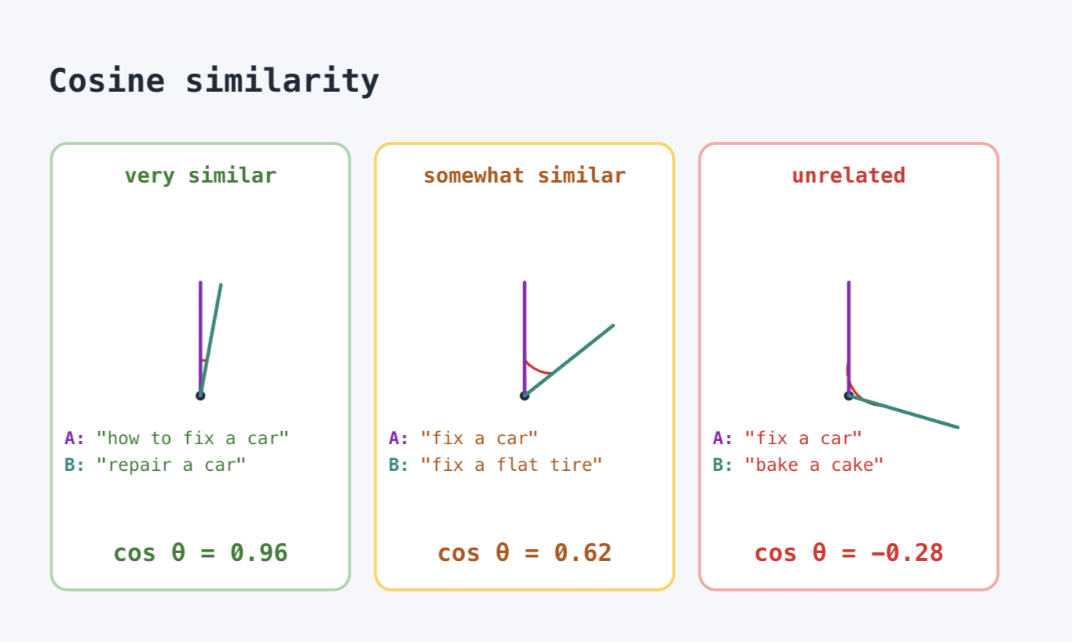
For example, embedding “car repair” and “automobile maintenance” and comparing the two vectors with this formula yields a similarity score around 0.847 - close to 1.0, reflecting their shared meaning despite having no words in common.
Distance Metric Comparison
| Metric | Best for | Notes |
|---|---|---|
| Cosine | Text similarity, NLP models | Robust to different vector magnitudes. Most common default. |
| Dot product | When embeddings are normalized | Faster than cosine if vectors are unit-normalized at index time. |
| Euclidean (L2) | Image embeddings, spatial data | Sensitive to magnitude - works best with models trained for it. |
| Manhattan (L1) | Sparse or grid-like data | Sums absolute differences instead of squaring them - less sensitive to outliers than Euclidean. |
6. Why Similarity Alone Is Not Enough
Vector similarity is a powerful primitive. But a real search system needs several more things working alongside it:
- Filtering: Return only documents within the last 30 days. Return only items the current user has permission to see.
- Exact matching: A query for “SKU-48291” must match that exact SKU. Semantic similarity might drift to adjacent IDs.
- Access control: Multi-tenant systems must scope results to the current workspace. Similarity search crosses tenant boundaries.
- Ranking signals: Recency, popularity, personalization - payload values that should influence result order beyond pure similarity.
The SKU Problem - A Concrete Example
# Query: "SKU-48291 issue"
# Semantic model may return:
#   SKU-48292  (score: 0.91)  ← wrong product
#   SKU-48291  (score: 0.89)  ← correct product
#   SKU-48290  (score: 0.87)  ← wrong product

# With an exact filter applied:
# must: { key: "sku", match: { value: "SKU-48291" } }
#   SKU-48291  (score: 0.89)  ← only correct result returned
Key Insight
Dense similarity finds the neighborhood. Filters, exact matches, and payload constraints find the right point within that neighborhood. You need both.
7. Modern Search = Hybrid Systems
Production search today combines multiple retrieval signals in a single pipeline. Each signal handles a different class of query. Together, they cover the full spectrum of how real users search.
Hybrid Search Components
- Dense: Semantic / vector - Intent, vibe, meaning
- Sparse: BM25 / keyword - Exact terms, rare tokens
Where Hybrid Search Is Used
- Multimodal RAG - retrieve relevant text, images, audio, and video for LLM context windows
- Agentic AI systems - multi-step agents that query different data sources sequentially
- E-commerce - find semantically similar products, then filter by price, brand, and availability
- Knowledge bases - semantic over documents, keyword for exact references and code snippets
- and more…
Quick Comparison
| Approach | Strength | Limitation |
|---|---|---|
| Keyword / Grep | Fast, exact matching | No semantic understanding - misses synonyms and paraphrases |
| BM25 / TF-IDF | Great for rare or specific terms | No synonym handling - relies entirely on word overlap |
| Semantic / Dense | Understands meaning and intent | Can miss exact tokens - ‘SKU-48291’ may drift to similar IDs |
| Hybrid | Best of both worlds | More complex to build, tune, and operate |
8. References & Further Reading
Qdrant Concepts - Qdrant Overview
- Overview of Qdrant’s vector search engine - collections, points, payloads, and APIs.
Distance Metrics Deep Dive - Distance Metrics - Qdrant
- Cosine, dot product, Euclidean, and Manhattan - when to use each.
Filtering & Hybrid Search - Filtering - Qdrant
- Payload filter syntax, indexed fields, and combining filters with vector queries.
RAG Tutorials - RAG Tutorials - Qdrant
- End-to-end retrieval-augmented generation tutorials using Qdrant as the retriever.
What’s Next - Module 2
In the next module, we’ll break down:
- What is a vector and why does it have hundreds of dimensions?
- How do dimensions actually represent meaning?
- How similarity really works under the hood - and when it fails.
- Your first Qdrant collection: points, payloads, and your first query.
End of Module 1. Continue to Module 2: First Principles of Vector Search.